



TL;DR
Use an LLM’s varying output to write deterministic artifacts such as code or a modeling script, then trust, rerun and correct the artifact.
That costs less and works better than asking the LLM for the final picture.
It holds outside code too: I designed shelving for our living room this way.
Language models generate stochastically. Ask twice and you can get two different answers. That variability matters less when the output is a script, because you keep the script, run it, and fix it where it’s wrong. A script does the same thing every time. Coding agents already work this way. Designing shelving for our living room showed me the same approach works for designing a space: have the LLM use “headless” (command line) modeler that it can program, have it build models to represent the image and base its generations on those models, then rerun and correct the scripts instead of asking it to draw the picture on its own. It’s cheaper and better.
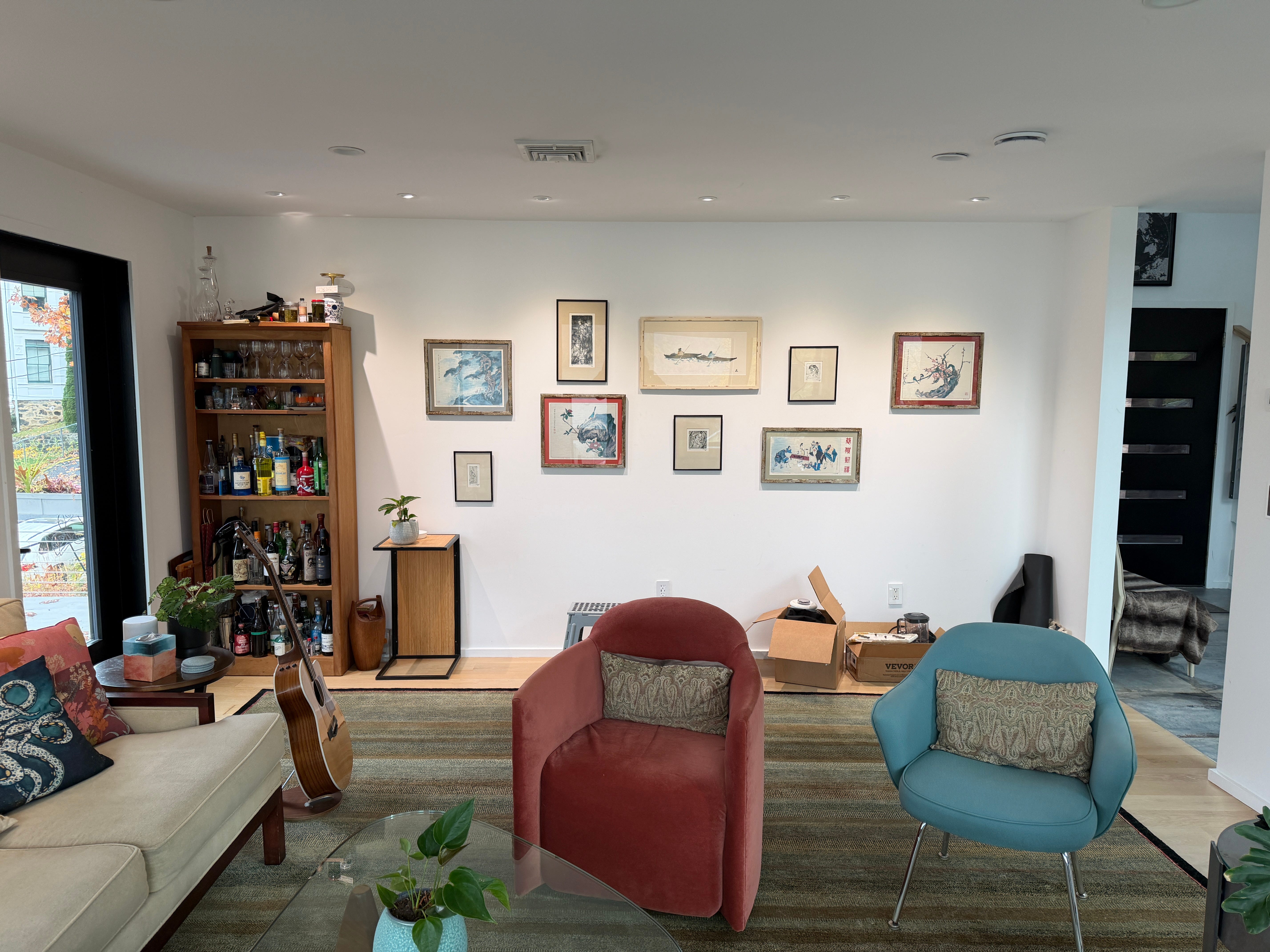
My partner Joanie and I wanted to design a full wall shelving unit in our living room. It’s a big job. The constraints were specific: it had to work around art we wanted for the wall, with a bar one bay in and matching half-height cabinets at each end. I wanted to see it from the front and from a right three-quarter angle, in the actual room, before anyone cut anything.
This seemed like a reasonable job for image generation. It wasn’t, at least not by itself.
Plausible Is Not Consistent
The first renders looked like furniture. They didn’t look like the same furniture twice. My feedback from that stretch reads like a bug tracker:
“The depth/perspective is off. Let me see the adjusted front view (never saw it) and render using the modeler.”
“Cabinet depths are inconsistent”
Each of those is a consistency failure. An image generator produces a new picture each time, and nothing carries the cabinet depth from the front view to the side view. You can ask it to fix the legs and get a picture with centered legs and a different cabinet. Developers know this problem from another direction: it’s what happens when there’s no single source of truth and every consumer reconstructs state on its own.
Our designer told us about a client who had already learned this the expensive way. The client ordered furniture based on GPT image generations, and it didn’t fit. The pictures looked right. The measurements in them weren’t real.
Have Codex Write the Script
So the design moved into Blender. I didn’t open Blender and model anything. Codex did all the building by writing Python scripts that created and edited named objects with explicit dimensions, positions, materials and cameras. When I wanted a different view, Codex moved a camera. The geometry stayed put.
Before, every request produced a new interpretation of the room. After, every request was an edit to a saved scene, and every view was a rendering of that scene.
This is the coding pattern applied to CAD. Codex’s output varied the way any LLM’s output does, but what it produced was a script, and the script produced the same geometry each time it ran. Codex got an overlap wrong at one point: the scene had top boards overlapping by 0.8in. The correction went into the script, and version 22 replaced the overlapping boards with one continuous top shelf. Codex’s generation did the work of deciding what to build. The script held the result.
I asked for something I’d ask of any system I was about to trust:
“Confirm all dimensions, individual and aggregate”
And then:
“Give me a blueprint with them.”
With a Blender model, those requests have answers. Without one, I had no answers to give.
Correct the Blender Model, Not the Picture
Corrections stopped being prompt wrangling. They became changes to values. The cabinet bodies went to a uniform 16in depth. Supports were centered 9in from the wall (1in wall gap plus half the 16in depth). Panel joins were checked. The five-bay layout stayed. Because the front render, the photo composite and the dimension schedule all draw on common values in the Blender model, a fix made once showed up everywhere.


None of this was an automatic CAD pipeline. The scripts that generate documents from the Blender model still needed their own consistency checks. And the script had a bug of its own. It set Blender object dimensions one axis at a time, which left the horizontal panel widths wrong. The Blender Python API documentation for Object.dimensions warns that assigning to it or its members several times in a row won’t work correctly, because it needs up-to-date evaluated data. The finalization script now sets the full dimensions tuple at once and checks the resulting geometry.
That bug was findable. The wrong widths were sitting in the Blender model as numbers. You can’t grep a generated image.
Ground It in the Physical World
A Blender model can be internally consistent and still wrong. The inputs had to come from somewhere real.
Room photos set the starting constraints. For the footing hardware, my partner Joanie photographed an actual foot on a visit to an assembler’s factory. Her hand is in one of those photos, which gave a rough sense of scale but is not a ruler. She didn’t know who made it, so we had GPT look it up. It turned up a candidate: the Emuca Zero system’s circular leveler for floor-ceiling profiles, with a 64mm foot diameter per the manufacturer’s technical drawing.
Candidate is the important word. The search did not establish that this is the same hardware. Emuca’s installation drawing shows screw fixing, so I’m not going to describe it as a drill-free pressure system either. What the Blender model gives me is a place to record that uncertainty. The foot has dimensions in the scene, those dimensions have a source, and the source is labeled provisional.
The precision cuts both ways, and that’s useful. The cabinet bodies are 16in deep with a 1in wall gap, which puts the front face at 17in. The closed door and pull assembly extends farther; the model’s validation file records the pull tip at 17.855in. Two of the inputs are provisional. The pull is conceptual hardware in the model, and the 18in side return at the right end of the wall is a figure I reported, with the trim and face measurements still to be checked on site. Against that return, the pull leaves a computed 0.145in. I wouldn’t have known to worry about that from a rendering. It’s a tolerance concern, not a confirmed fit or a confirmed problem, and it’s on the list to measure.
Same with the room. The Blender model’s overall foot-to-foot width is 170.52in. The room width of 182in was reported to me. We’ll confirm our numbers before we sign the contract.
Appearance Without Giving Up Geometry
Then I asked for lighting:
“The shelves have downlighting, strips in the middle lengthwise. So do the cabinets.”
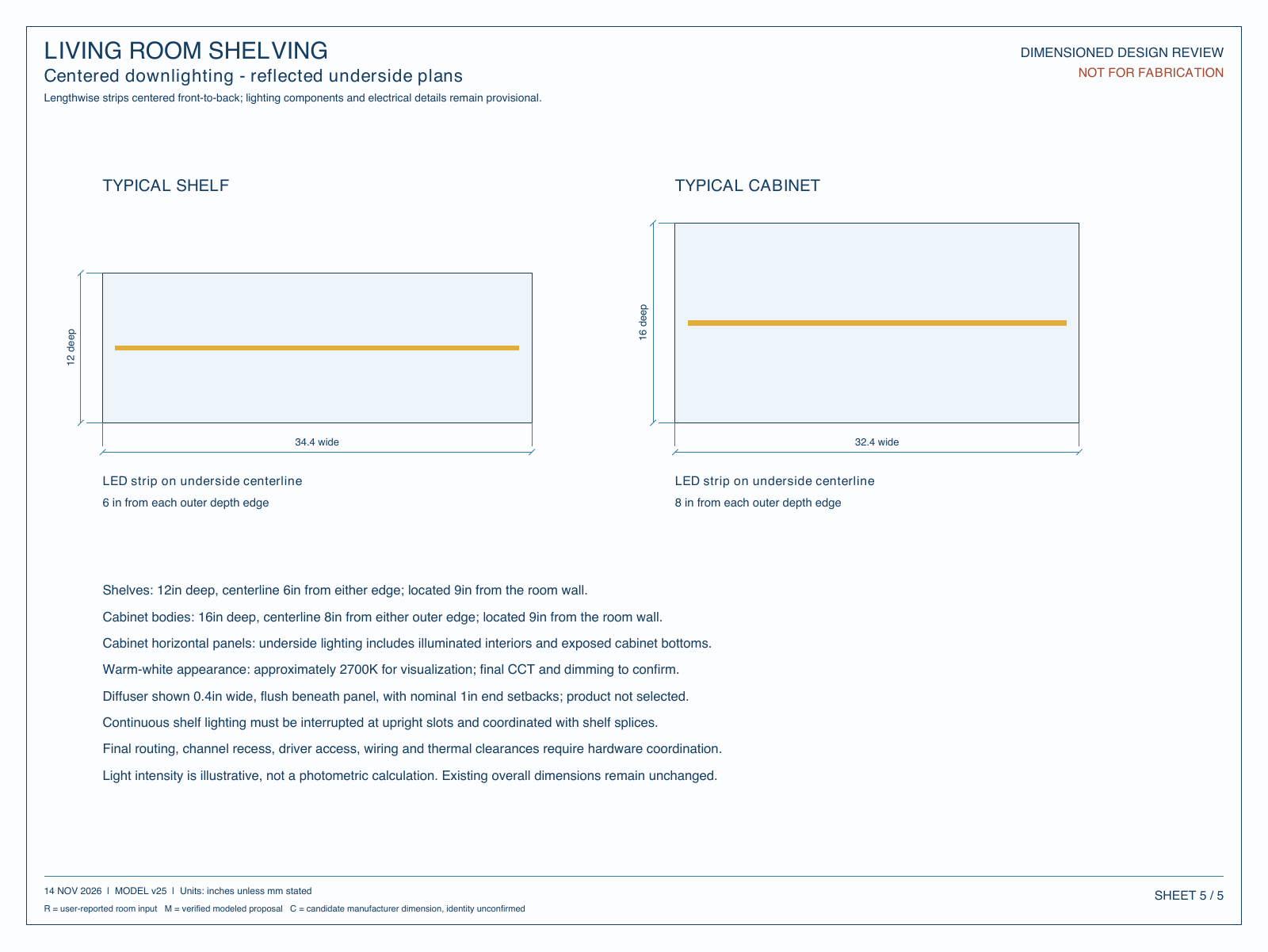
Version 25 adds warm-white strips along the underside centerlines of the shelves and cabinets. The color (roughly 2700K) and the intensity and channel size are illustrative. This is a visualization, not a photometric plan.
Version 26 populated the shelves with things we own: glassware, vessels, cups, bottles, plants. Those came from two photographs, and they went in as approximate 3D objects. Shapes, decoration and sizes were estimated. They are not photo cutouts, scans or photogrammetry. Tall pieces were sized to fit 23.35in openings, which means those sizes need real measurements before I’d say any of them fit.
The approximations didn’t touch the furniture geometry. Version 26 adds decorative objects; the shelving is the same as v25. Appearance got layered on top of a Blender model that still holds its dimensions.
The Outcome
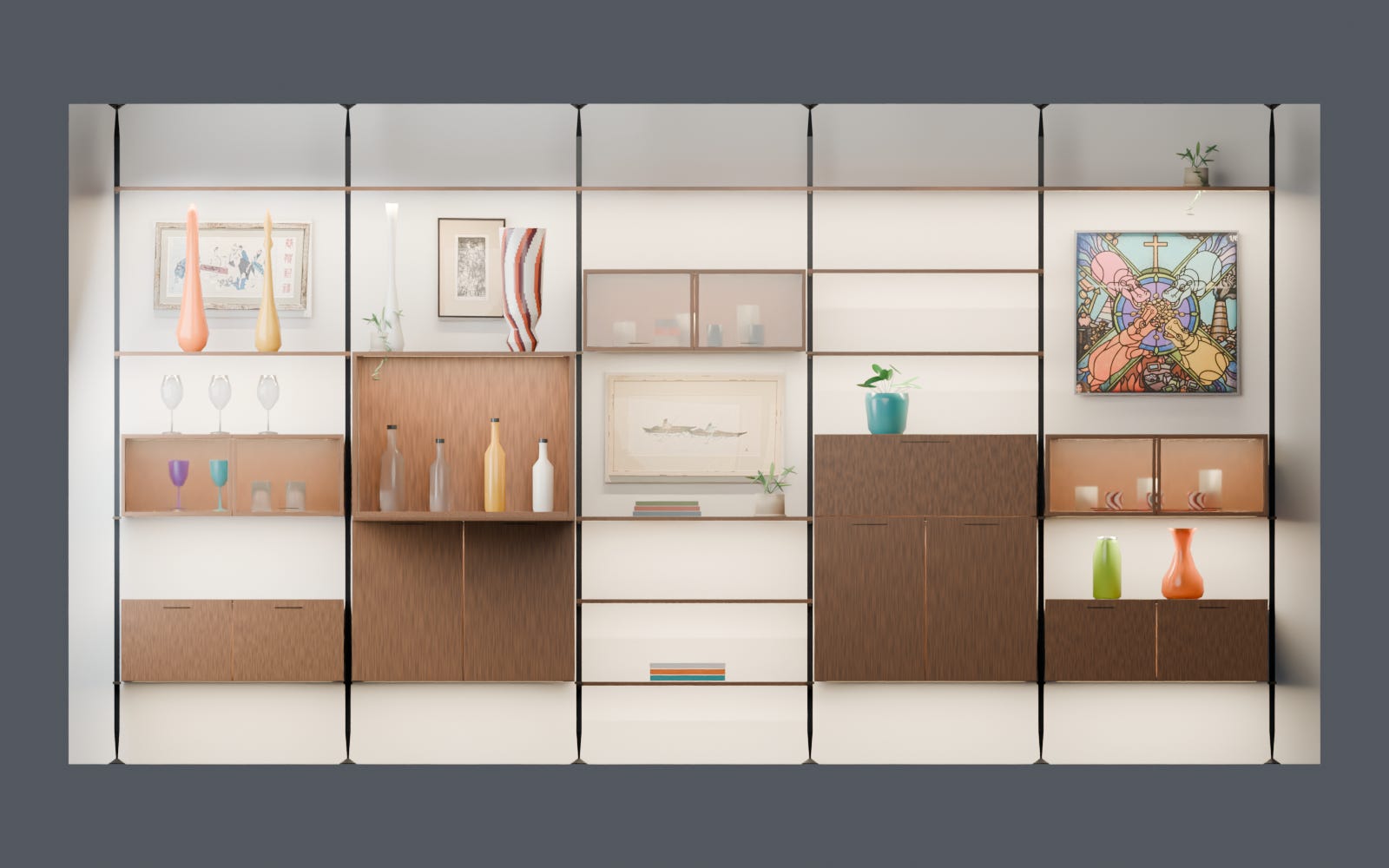


What came out of this: the native Blender model, a front render, a right-side render composited over the room photo, and a five-sheet blueprint covering dimensions and lighting placement.
Correcting the Blender model was also cheaper than regenerating pictures. In my image-generation runs, each correction was another full generation, with another chance to break something that was right. With the scripted scene, a new view was a camera change, and the depth fix in Figure 2 was a value change and a rerun.
These are design-review deliverables. Nothing has been built. Nobody has quoted fabrication, and nothing here is engineering approval. The composite keeps the model’s proportions, but the photo camera alignment is approximate, not surveyed.
The Other Inputs
No single tool produced this, and I’d rank that below the main point. I could tell this as a Blender story, but Blender alone would have been a blank scene I didn’t know how to drive. The other inputs fed the scripted Blender model, and each supplied something the others couldn’t:
Photographs grounded the room and the objects we own.
Image rendering made the design something I could look at and react to.
Web search produced candidate real-world hardware with published dimensions.
Blender held persistent, inspectable geometry.
Codex wrote and revised the scripts that built the Blender model and coordinated the other tools.
My review caught the depth problem, the leg problem, the inconsistent cabinets, and pushed for the dimensions and blueprint.
They informed each other. The search results became the provisional foot. The modeled pull and the reported 18in return produced the clearance figure. The photos of owned objects became approximate geometry that had to fit real openings, which produced a list of things to measure. Remove the scripted Blender model and nothing holds still long enough to correct.
Coding Gets This for Free
When I write about coding agents, I keep landing in the same place. The LLM is less important than what surrounds it: the harness, the tests, the specs, the state that persists between turns. I made that case in It’s The Harness, Stupid! and again in What Is Harness Engineering?. Code is a friendly domain for this because the deterministic artifact is the default output. The LLM writes code, and the code lands in a repo where you can diff it and run tests against it.
On this project, my image requests asked for the final output itself. Each new picture was generated fresh, and I was the only memory and the only consistency check. That was exhausting.
What changed in this project was asking for a different kind of output. Codex’s generation produced scripts, Blender ran them, and the relationships between parts stayed explicit across every view. My job moved from re-describing the room to reviewing the Blender model: are these dimensions right, is this assumption sourced, will this pull clear the 18in return.
Determinism here means inspectable dimensions and persisted geometric relationships. The AI didn’t become deterministic. Renders aren’t bit-identical. The Blender model doesn’t automatically match reality, and it was wrong more than once. Explicit geometry made those errors visible and made the fixes repeatable. That’s the same thing tests do for code. I wrote about why that procedural layer is where trust comes from in Trust Is Procedural, Not Cognitive, and about checking the checker in Who Tests the Test Environment?. The panel-width bug is a small instance of that second problem.
So my practical advice for anyone using AI outside a codebase: before you ask for another picture or another answer, ask whether the LLM can write the script that produces it. Give the AI something it can program which then creates the output you can inspect. Argue with the code, not the inference.
Bob Matsuoka is CTO of Duetto, a hospitality profit and revenue-management platform.
Related Reading:
It’s The Harness, Stupid!: why the tooling around a model matters more than the model.
What Is Harness Engineering?: the skill of building the structure an agent works inside.
Trust Is Procedural, Not Cognitive: trust in AI output comes from process and checks.
Who Tests the Test Environment?: the verification layer has bugs too.