


The pattern shows up constantly when I look at MCP server implementations. Someone discovers the protocol, gets excited about giving agents tool access, builds a server in a weekend, ships it to the registry. Six tools. Maybe eight. Each one is basically a direct passthrough to whatever SDK the underlying service provides.
And for about a week, it feels like it works.
Then the agent needs to do something real. Archive 400 emails from a specific sender. Pull all calendar events for Q1, cross-reference them with a project timeline, and generate a summary. Move a batch of files across Drive folders. The agent starts calling tools in sequence, hits rate limits, gets confused about pagination, makes the same API call twelve times trying to work around a 50-item response limit that the MCP tool never exposed as a parameter. Eventually it either fails or produces something partially wrong, and nobody’s quite sure where the breakdown happened.
The bottleneck isn’t MCP. The protocol did exactly what it was supposed to do — it gave the agent a clean interface for calling tools. The bottleneck is what’s behind the MCP server.
I’ve built a lot of these now. gworkspace-mcp has 115 tools across Gmail, Calendar, Drive, Docs, Sheets, Slides, and Tasks. slack-mpm has 40+ tools plus a full async Python API library underneath that can run entirely without an agent in the loop. The gap between those projects and most of the reference MCP servers I’ve seen is not complexity — it’s architecture. Specifically: whether there’s a real API underneath the MCP layer, or whether the MCP tools ARE the implementation.
That distinction matters more than almost anything else when you’re building tools that agents will actually use in production.
TL;DR
MCP servers built as thin wrappers over service SDKs hit hard ceilings when agents need to do anything at volume or across operations
The reference Slack MCP server has 8 tools; a production implementation needs 40+, with a real API library underneath it
The three-layer pattern (API → MCP → Skills) has a specific job at each layer — remove any one and the system degrades in a predictable way
Tool description quality is the single biggest lever on agent behavior; bad descriptions produce bad decisions regardless of what’s underneath
Thin wrappers are fine for prototypes and read-light tools; the inflection point is when you want to write a script that does what the agent does
The Official Slack MCP Server Problem
The reference Slack MCP server — currently maintained by Zencoder after leaving the official MCP registry — offers eight tools. List channels. Post a message. Reply to a thread. Add a reaction. Get channel history. Get thread replies. Get users. Get a user profile. That’s it.
For a demo, that’s fine. For anything agents actually need to do with Slack, it hits walls quickly.
My slack-mpm server covers 40+ tools: search messages by date range and keyword, manage bookmarks, set reminders, handle scheduled messages, list workspace members with filtering, manage file uploads, archive channels. The implementation underneath is a clean async Python API — 47 functions across eight modules — that you can call directly from scripts without an agent in the loop at all.
The functional gap is obvious enough. What’s less obvious is why it exists.
The reference server isn’t thin because Slack’s API is thin. Slack’s API is extensive. The server is thin because it was built without a real API library underneath it. The MCP tools are the implementation — there’s no abstraction layer, no pagination handling, no rate limit management, no batch operation support. Each tool calls the Slack SDK directly and returns the result.
That works for eight tools. It doesn’t scale to forty because the complexity you’re hiding from the agent — auth edge cases, cursor-based pagination, retry logic on rate limits, handling the difference between bot tokens and user tokens — has nowhere to live. There’s no library to put it in. So you either skip the complex operations entirely, or you dump that complexity into the MCP tool handler itself, which makes the tool fragile and hard to maintain.
The reference server chose the first option. Which is reasonable for a reference — but it means agents using it can’t search Slack properly (search requires user tokens; the server only supports bot tokens), can’t do bulk operations, can’t run scheduled tasks, can’t be used programmatically outside of an agent context.
This isn’t a knock on the people who built it. It’s a knock on the pattern of treating MCP as the architecture rather than the interface.
Phil Schmid made a similar observation in January in a piece called MCP is Not the Problem, It’s Your Server: “MCP servers are not thin wrappers around your existing API. A good REST API is not a good MCP server.” Correct, but it doesn’t go quite far enough. The problem isn’t just that REST APIs make bad MCP servers — it’s that MCP servers without any abstraction layer underneath them make bad tools, regardless of what the underlying service looks like.
What a Real API Gives You
When I started building gworkspace-mcp, I made a decision early that turned out to be foundational: build the Google Workspace API library first, then write the MCP server as a thin interface on top of it. The API library handles auth, pagination, rate limiting, and error normalization. The MCP tools are mostly one-liners that call the right API function and return the result.
That decision shows up in five specific ways.
Pagination at the library level. Gmail’s API returns 50 messages per page by default. If an agent wants to archive everything from a specific sender over the past six months, that might be 400 messages across eight API calls. If the MCP tool handles pagination — which means the API library handles it — the agent calls one tool and gets back 400 message IDs. If pagination isn’t handled, the agent manages cursor iteration itself: call the tool, get 50 results, extract the cursor, call again, repeat. Agents do this badly. They lose track of cursors, make redundant calls, or give up after the first page and tell you they found the 50 most recent messages.
Rate limit management that doesn’t leak up. Rate limits handled in the API layer are invisible to the agent. The tool call either succeeds or returns a clean error. Rate limits handled in the tool handler either block the agent or require the tool description to explain retry patterns — which agents then implement inconsistently. The complexity belongs in the API layer. That’s the only place it can be handled reliably and tested against real behavior.
Reuse across contexts. The slack-mpm API library runs five standalone scripts — archiver, digest, listener, notifier, responder — that operate on schedules without any MCP involvement. The same code that handles pagination and auth in the MCP context handles it in the cron job context. This isn’t a nice-to-have: it means the code is continuously exercised against real-world conditions, not just when an agent happens to call it.
Actual testability. You can write unit tests for an API library. You can mock the underlying service calls, test pagination edge cases, verify that rate limit handling works correctly. Testing an MCP tool handler without running an agent session is hard to do meaningfully — you end up testing it by watching it fail in production. The difference in reliability compounds over time, and it compounds fast.
Composability. Some operations are inherently multi-step. Finding all calendar events associated with a project and generating a summary requires fetching from multiple calendars, filtering by keyword, sorting by date, and formatting the output. That can live in the API layer as a single higher-order function. The MCP tool calls the function. The agent sees one tool call that returns a clean result instead of orchestrating a dozen calls and trying to assemble the output itself.
Aditya Mehra put it well in a December 2025 piece on production MCP architecture: “Design for what agents need to accomplish, not for what APIs happen to exist. Your APIs were designed for developers building applications. Your MCP servers should be designed for agents completing tasks.” The API layer is where you do that translation. The MCP layer is where you expose the result.
The Three-Layer Pattern
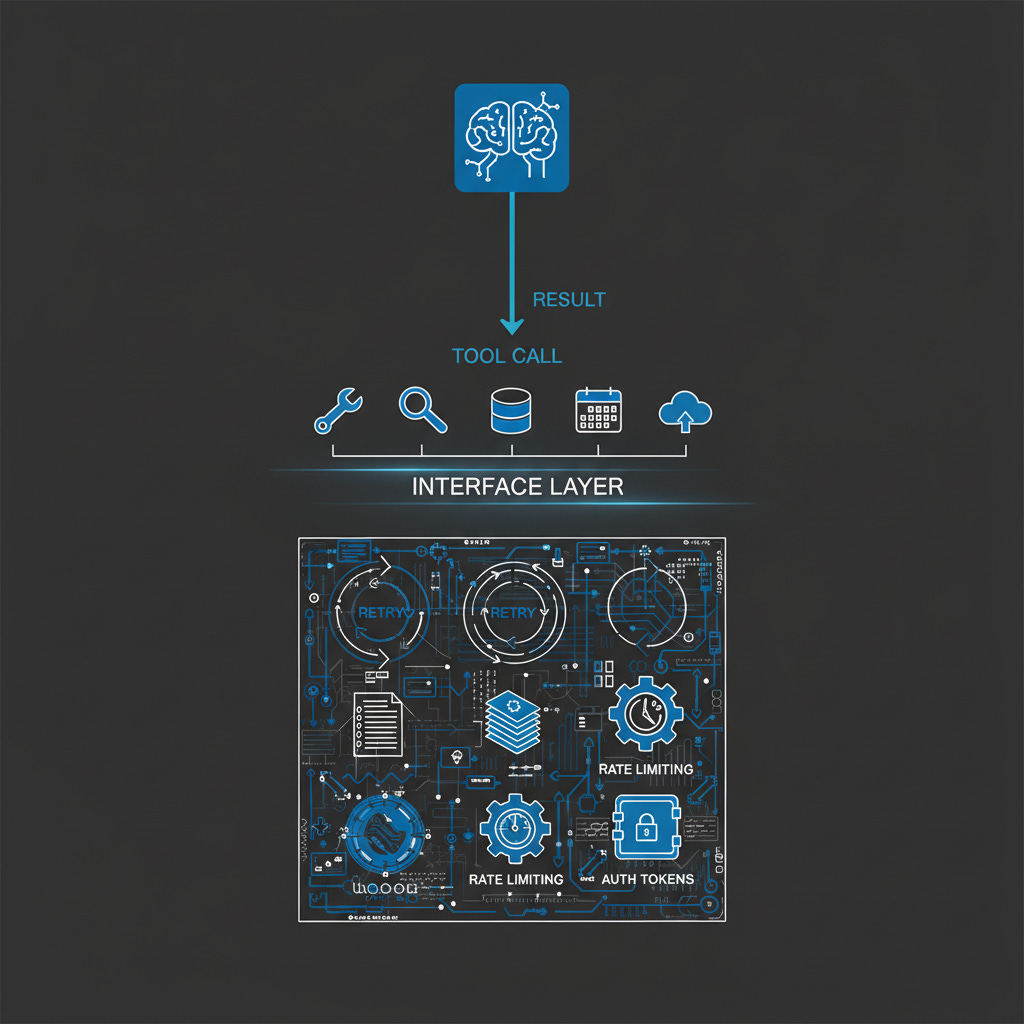
The architecture I’ve converged on has three distinct layers, each with a specific job. Removing any one of them degrades the system in a predictable way.
Layer 1 — The API library. This is where the complexity lives. Auth handling, including token refresh and the difference between scoped token types. Pagination, including cursor management and automatic result aggregation. Rate limit management, with exponential backoff and respect for per-method limits. Error normalization, so the MCP layer receives clean, typed errors rather than raw API exceptions. Batch operations, so the agent can request 400 results and the API handles chunking appropriately.
The design test for this layer: you should be able to write useful scripts against the API library without involving an agent at all. If you can’t, the abstraction is at the wrong level.
Layer 2 — The MCP server. Thin. The tool handler should be almost trivially simple: validate inputs, call the API function, return the result. If a tool handler is doing significant work, something belongs in the API layer instead. Tool descriptions are not trivial — they’re the interface contract with the agent and deserve careful attention — but the execution path should be short. A handler that’s more than twenty lines of real logic is usually a sign something is in the wrong place.
The design test here: each tool should do one thing, and it should be obvious which tool to use for a given operation. When agents have to guess between tools, they guess wrong.
Layer 3 — The skills document. This is the layer most implementations skip, and it’s often where production agent behavior falls apart. The skills document tells the agent how to use the MCP tools effectively: what tools exist, when to use each one, which combinations work well together, what to avoid.
Without it, agents discover capabilities by trial and error — hitting rate limits unnecessarily, calling the wrong tool for the job, making redundant calls when one batched call would do. With it, agents start from a baseline of competent behavior and only deviate when they encounter something they haven’t hit before.
The skills document is institutional knowledge in structured form. It captures what took me hours of iteration to learn about each service — which Gmail search operators work reliably, when to use Drive’s query syntax versus simple name search, how to structure a Sheets batch update to avoid cell reference errors. That knowledge doesn’t exist anywhere else. It lives in the skills document or it doesn’t exist, and the agent stumbles into the same mistakes I made during development.
The MCP community is starting to recognize the description-as-instruction principle. Schmid’s framing is that “every piece of text is part of the agent’s context.” True, but individual tool descriptions can only carry so much. The skills document is where higher-order guidance lives — how to think about sequencing operations, when not to use a tool, what the common failure modes look like. Think of it as runtime instructions for agents, not documentation for humans.
When MCP Alone Is Enough
There are cases where thin MCP wrappers are the right call, and it’s worth being direct about them.
Simple, low-volume reads. If an agent needs to check weather, query a single record from an external service, or look up one user profile, a thin wrapper is probably fine. The complexity ceiling exists but may never be reached. Building a full API layer for a tool that makes one API call per agent turn is engineering overhead that doesn’t pay off.
Prototyping and exploration. A server built in a day is often the right first step because you don’t know yet which operations the agent will actually need. I’ve shipped thin wrappers deliberately as a way to learn before investing in a proper API library. The Zencoder Slack server probably started that way. The mistake isn’t building a thin wrapper for exploration — it’s leaving it there when the agent starts doing real work and the wrapper’s limits start showing.
Single-agent, single-purpose tools. If a tool is purpose-built for one agent doing one thing and the scope is genuinely narrow, the three-layer overhead may not be worth it. The architecture makes sense when tools need to be reused across contexts, when operations are high-volume, or when the underlying service is rate-sensitive.
Read-heavy, write-light operations. The complexity of batch operations, cursor management, and retry logic matters most when you’re writing or doing high-volume reads. A tool that fetches a single resource per agent turn doesn’t need much abstraction.
The honest signal for when you need the full pattern is one of three things: you find yourself wanting to write a script that does what the agent does, the agent hits the same rate limit more than once in a session, or you start duplicating error handling logic across tool handlers. Any of those is the inflection point. At that moment, adding the API layer is less work than continuing without it.
Building Your Own: Where to Start
Start with the API, not the MCP server. The most common mistake is writing the MCP tool first — it seems like the path of least resistance — and then adding abstraction as you hit problems. The trouble is that tool handler code is hard to refactor. The MCP interface shapes how you think about the operations, and that framing tends to be too granular. Starting with the API forces the right level of abstraction from the beginning.
Design the API around operations, not endpoints. Slack’s Web API has dozens of endpoints, but agents think in operations: send a message, search conversations, get user context. The API library should expose those operations, even when the underlying service requires two calls to complete one. Complexity belongs in the library. The agent-facing interface stays clean.
Invest heavily in tool descriptions. The single biggest lever on how well agents use your MCP server is description quality. That means specific parameter descriptions, not just type annotations. It means clear examples of when to use this tool versus a similar one. It means explicit notes about what a tool cannot do — agents will try to use tools for operations they weren’t designed for, and a good description cuts off the most common wrong paths before they happen.
Write the skills document while you build. Don’t wait until the server is done. Every time you notice the agent doing something inefficient — calling four tools when one would work, misunderstanding a parameter’s purpose, hitting a rate limit that could have been avoided — write that observation down immediately. The skills document is most valuable when it’s written from observation of real agent behavior, not reconstructed after the fact from memory.
The gworkspace-mcp repository on GitHub is a worked reference — 115 tools across seven Google APIs, one coherent server, the three-layer pattern at scale. Not the only way to implement this, but a concrete example of what the architecture looks like when the abstractions have had to earn their keep over months of real use.
Bob Matsuoka is CTO of Duetto and writes about AI-powered engineering at HyperDev.
Related reading:
AI Power Ranking — Tool comparisons and benchmarks for AI practitioners
LinkedIn Newsletter — Strategic AI insights for CTOs and engineering leaders
Edits:
Fixed link to slack-mpm