


We spend a lot of time talking about token costs. API budgets. The $200/month subscription that gets exhausted in three days. But here’s something that flips that entire conversation: vector search costs you nothing after the initial index.
Zero. Once your codebase is embedded, searches are pure math. No inference. No API calls. No watching your Claude Max credits drain while you hunt for that authentication middleware you know exists somewhere.
I’ve been building mcp-vector-search for the past few months, and it’s become one of the most useful tools in my development workflow—not because it’s fancy, but because it’s always there. No rate limits. No “please wait” messages. No monthly bill anxiety.
Why Semantic Search Beats Grep for LLM Context
Here’s what traditional code search gives you: exact string matches. Grep finds authenticate_user. Ripgrep finds it faster. Neither one finds “the part of the code that handles login verification” when somebody named that function verify_credentials instead.
Semantic search understands meaning. Ask for “authentication middleware” and it returns code that does authentication—regardless of what the developer named things. Ask for “error handling patterns” and it finds try/catch blocks, custom error classes, logging calls, the whole ecosystem of how your codebase deals with failures.
But here’s the thing that really matters for LLM-assisted development: this makes coding agents dramatically more effective.
Augment Code figured this out early. Their context builder uses vector search to understand your codebase—it’s one of the reasons Auggie can answer questions about your project without chewing through every file. Claude Code doesn’t have this yet. It relies on scanning, grepping, reading directories. Works, but it’s slower and burns tokens doing reconnaissance.
mcp-vector-search gives Claude Code users a similar advantage. (I’m sure Augment has additional tricks up their sleeve, but the core capability is the same.) The agent asks “where does this project handle database connections?” and gets precise, ranked results in milliseconds. No scanning. No guessing. Just direct access to relevant code.
The Cheap LLM Layer
Vector search alone returns code chunks ranked by semantic similarity. Useful, but sometimes you want more than raw results.
So I added a thin LLM controller layer. Nothing expensive—Haiku or GPT-4-mini for quick query generation and result consolidation. The model helps translate natural language questions into effective search queries, then synthesizes the results into coherent answers.
The economics work because the LLM does minimal work. It’s not reading your entire codebase. It’s not generating code. It’s just:
Turning “how does auth work here?” into an optimized search query
Looking at the top 5-10 results
Summarizing what it found
Total cost per question? Fractions of a cent. Maybe a penny for complex queries.
For actual Q&A—”explain the main architecture” or “walk me through the payment flow”—I bump up to Sonnet or GPT-4o. These need reasoning, not just consolidation. But even then, the context is pre-filtered by vector search, so the models see exactly what they need instead of wading through irrelevant files.
The Killer Combo: Answerable Codebases
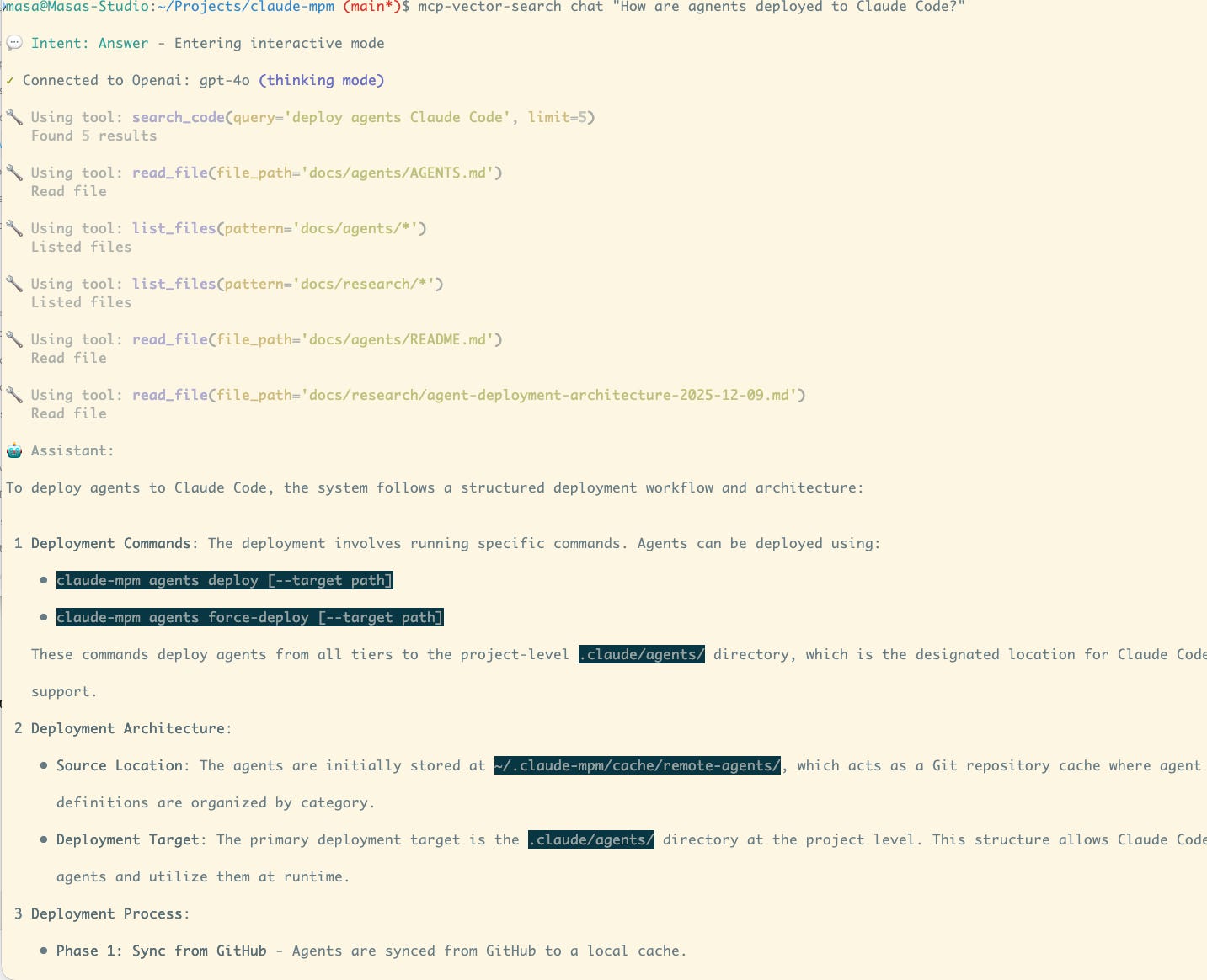
Give an LLM access to vector search tools and something interesting happens. Your codebase becomes answerable.
mcp-vector-search chat “how does the login flow work?”
The tool searches semantically, retrieves relevant code, feeds it to the LLM, and returns an explanation grounded in your actual implementation. Not generic advice about authentication patterns. Your code. Your architecture. Your specific implementation details.
This works through MCP integration too—Claude Desktop can query your indexed codebase directly during conversations. Ask about your code while you’re planning changes, and Claude pulls the relevant context without you having to copy-paste files into the chat.
What’s Available Now
Everything I just described ships today:
# Install
pipx install mcp-vector-search

# Index your codebase
cd your-project
mcp-vector-search init
mcp-vector-search index

# Search semantically
mcp-vector-search search “authentication middleware”

# Chat with your code
mcp-vector-search chat “explain the main architecture”
The chat command does dual-intent detection—it figures out if you’re asking a question (explain something) or searching (find something) and responds appropriately. Add --think for complex reasoning that uses the heavier models.
MCP server integration means Claude Desktop can use your indexed codebase as a tool:
mcp-vector-search setup --platform claude_desktop
Then Claude has access to search_code, search_similar, search_context, and other tools for querying your project during any conversation.
Coming Soon: Structural Analysis
Vector search tells you what code means. But it doesn’t tell you if that code is a mess.
I’m adding an analyze command that does structural analysis—the kind of metrics you’d get from SonarQube or similar static analysis tools:
Cognitive complexity: How hard is this function to understand?
Cyclomatic complexity: How many paths through the code?
Nesting depth: How many levels deep does the indentation go?
Coupling metrics: How tangled are these modules?
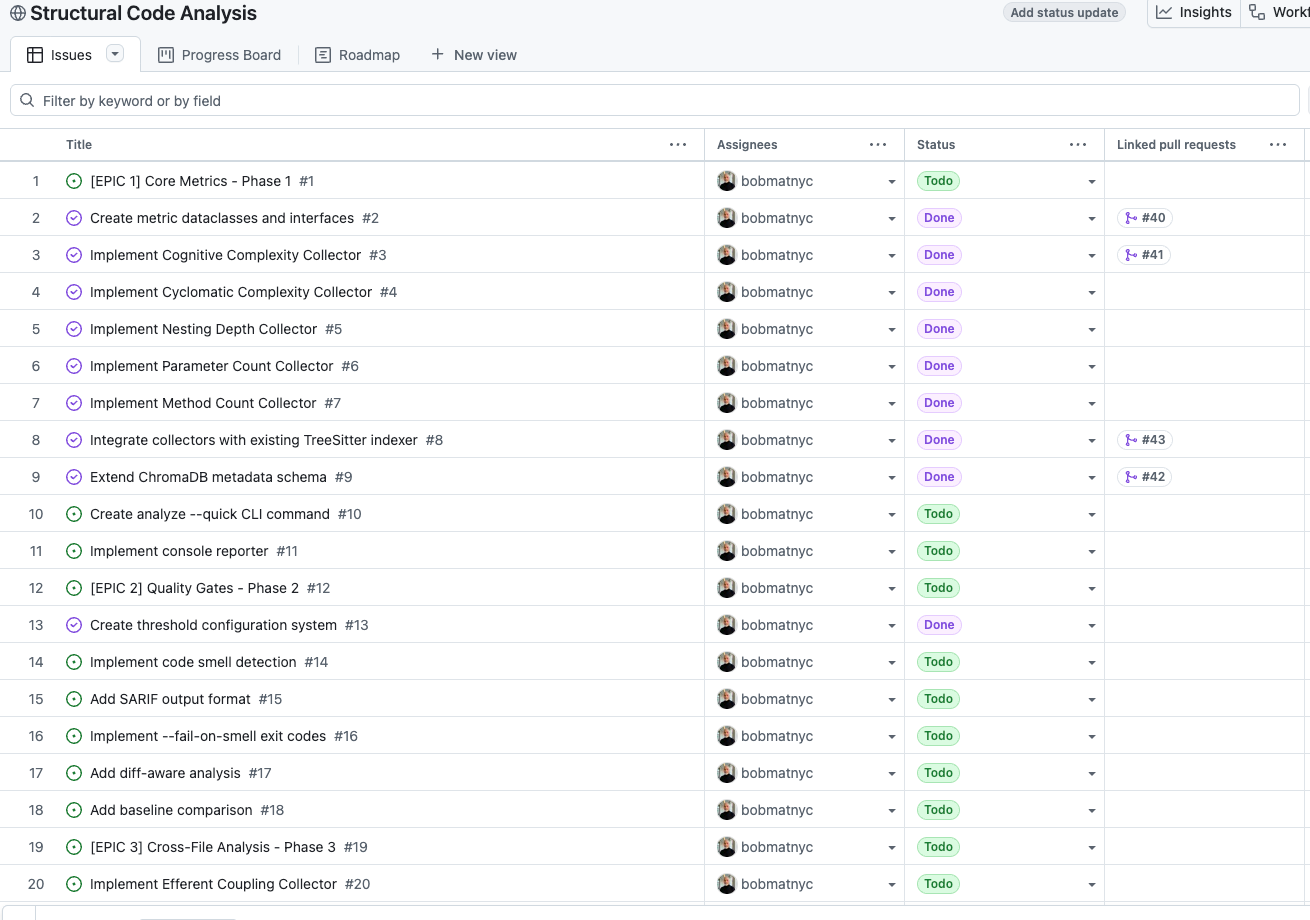
The goal: quality-aware search. Filter results by complexity (--max-complexity 15), exclude code smells (--no-smells), weight rankings by code health.
Just starting development on this now. Phase 1 targets core metrics, Phase 2 adds CI/CD integration with SARIF output, Phase 3 brings cross-file analysis for coupling and circular dependencies.
The TkDD Experiment
Here’s where it gets meta. I’m building this entire feature using Ticket-Driven Development with Claude-MPM.
The workflow: my agents created the tickets (using mcp-ticketer, another tool worth checking out), and they’ll build the project from those tickets, updating progress as they go.
If you’re interested in TkDD—how AI agents can orchestrate complex projects through structured ticket workflows—you can follow along in real time:
Project Board: https://github.com/users/bobmatnyc/projects/13
Milestones: https://github.com/bobmatnyc/mcp-vector-search/milestones
Watch the tickets move from Backlog → Ready → In Progress → Done. See the commits reference issues. Watch PRs close tickets with evidence. It’s TkDD in public, with working code you can actually try at each milestone.
The Bottom Line
Vector search isn’t new technology. But packaging it as a CLI tool that any developer can install in 30 seconds and point at their codebase? That changes things.
Augment Code users have had this kind of semantic understanding built in. Now Claude Code users can get something similar—without the subscription, without the vendor lock-in, and without per-query costs eating into your budget.
No inference costs for search. Cheap LLM layer for intelligence. MCP integration for Claude Desktop. Structural analysis coming soon. All built in public with TkDD you can follow.
The future of code understanding isn’t better grep. It’s semantic infrastructure that makes your codebase queryable, analyzable, and answerable—without burning your API budget doing it.
mcp-vector-search is open source, as is mcp-ticketer.
I’m Bob Matsuoka, writing about agentic coding and AI-powered development at HyperDev. For more on multi-agent orchestration, read my piece on Claude-MPM or my analysis of the orchestration landscape.